If you’re wondering “What can Genspark Claw actually do?”, this is my hands-on summary based on my experience starting March 16, 2026. While I’m still exploring all capabilities, I want to share what I’ve learned so far.
Claw is an execution-style agent: you give instructions in chat, and an AI runs tasks for you on a dedicated Genspark Cloud Computer. Think of it as an AI remotely operating a cloud Linux desktop on your behalf.
Genspark vs. ChatGPT: “Conversation” vs. “Workspace + Deliverables”
Contents
- 1 Genspark vs. ChatGPT: “Conversation” vs. “Workspace + Deliverables”
- 2 Genspark Claw’s Positioning: “Your First AI Employee”
- 3 First Setup Challenge: “Claw Caddie” Password
- 4 Messaging Integrations: WhatsApp-First Approach
- 5 Pricing: Plans, Taxes, and Real Costs
- 6 First Impressions: Junior Assistant vs. Senior Staff
- 7 Value Analysis: Break-Even Calculation
- 8 Conclusion
If Genspark is new to you, it’s less of a “single AI chat” and more of a workspace that bundles multiple AI capabilities. Rather than just generating text, you can create slides, documents, manage files (AI Drive), generate images, and more—focusing on producing concrete deliverables.
Oversimplifying the comparison:
- ChatGPT: Conversation-centric (generate and iterate in chat)
- Genspark: Deliverable-centric (Slides/Docs and other outputs)
Genspark operates on a credit-based model where each plan provides certain credits, and usage consumes them accordingly. For detailed plan information, see my comprehensive guide (Japanese).
If you want to try Genspark with bonus credits, here’s my invite link for extra credits.
Genspark Claw’s Positioning: “Your First AI Employee”
Genspark markets Claw with:
Your first AI employee.
Paired with:
You don’t work with AI anymore. You hire AI to work for you.
My understanding is that this takes the “execution agent” concept (similar to open-source projects like OpenClaw) and packages it into a ready-to-use service with cloud infrastructure and messaging integrations included.
First Setup Challenge: “Claw Caddie” Password
When connecting to the Cloud Computer, I encountered “Claw Caddie” and got stuck because I didn’t know the initial password.
I eventually resolved this by asking Claude for help, but I’m sharing this because other first-time users might hit the same roadblock.
Messaging Integrations: WhatsApp-First Approach
WhatsApp Setup: Easy but Use a Test Account First
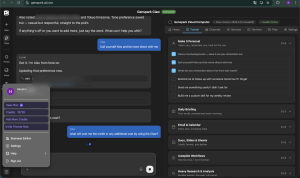
WhatsApp integration was straightforward: scan a QR code and you’re essentially done. However, I made a critical mistake by connecting my personal WhatsApp account immediately.
The result? Anyone who messaged me received automated error responses while the pairing was incomplete. This created awkward moments with family and friends.
Recommendation: Start with a separate test WhatsApp account, especially if you use WhatsApp for work or have many personal contacts.
LINE Integration (Primarily for Japan/Asia)
For users in regions where LINE is dominant (Japan, Taiwan, Thailand): I created my first LINE Business Account for this test. The setup took approximately 30 minutes to complete. Once configured, Claw appears as a contact in LINE for chat-based instructions.
This integration is less relevant for most global users but valuable in LINE-heavy markets.
Pricing: Plans, Taxes, and Real Costs
Cloud Computer offers two tiers: Standard and Powerful (different specifications), as documented in their help center.
I chose Standard. The pricing displayed was:
- $39.99/month (monthly billing)
- $34.99/month when billed annually
In my checkout experience, I couldn’t easily locate the monthly option and ended up with annual billing. This might be environment-specific (I was using VPN), but be aware if you prefer monthly payments.
Annual billing requires upfront payment:
- $419.99/year (base price)
Important for Global Users: Your final cost will likely exceed the base price due to:
- Local taxes (VAT/GST/sales tax: typically 10-25% depending on region)
- Currency conversion fees (if paying in non-USD currency)
- International transaction fees (from your bank/card)
I also received 10,000 bonus credits as a new user incentive. While nice, this represents roughly $20 in value, so don’t let it drive your decision.
Key Point: The subscription covers the virtual machine environment. You still consume credits for AI operations, including setup processes like messaging integration configuration.
First Impressions: Junior Assistant vs. Senior Staff
After several days of testing, my honest assessment:
Genspark Claw feels like a junior assistant—capable of useful work but requiring very detailed, step-by-step instructions to avoid errors.
Main Genspark platform (Super Agents, deliverable creation) feels like competent senior staff capable of producing high-quality outputs with minimal guidance.
Currently, these two systems feel somewhat disconnected. You can’t yet, for example, send a WhatsApp message that triggers a comprehensive Super Agent research workflow and automatically returns polished slides to your messenger.
If Claw eventually integrates seamlessly with Genspark’s deliverable ecosystem (Slides/Docs/Hub/AI Drive/Workflows), the value proposition could change dramatically. This is what I’m watching for future updates.
Current Recommendation: Not yet suitable for general recommendation due to pricing and setup complexity. However, it could be excellent for solopreneurs, small business owners, and creators who want messaging-based automation without extensive technical setup.
Value Analysis: Break-Even Calculation
The most practical way to evaluate this investment is through time savings:
Formula:
$$\text{Annual Cost} \div \text{Your Hourly Rate} = \text{Hours You Must Save Annually}$$
Using $419.99/year base price (before taxes):
| Your Hourly Rate | Break-Even Hours/Year | Required Weekly Savings |
|---|---|---|
| $25/hour | 16.8 hours | ~19 minutes |
| $50/hour | 8.4 hours | ~10 minutes |
| $100/hour | 4.2 hours | ~5 minutes |
Add 10-25% to these requirements if you pay local taxes. Essentially, if Claw reliably saves you 15-25 minutes of work weekly (depending on your rate), it pays for itself financially.
In my experience so far, I haven’t yet achieved consistent time savings at this level, but I’m continuing to experiment.
Conclusion
Genspark Claw represents an interesting approach to “AI employees” but isn’t ready for broad recommendation due to cost and setup complexity. The annual commitment and potential messaging integration mishaps require careful consideration.
However, for specific use cases—particularly solo founders, creators, and small businesses wanting chat-based AI automation—it offers unique capabilities worth exploring.
Since I’ve committed to the annual plan, I’ll continue testing and share any breakthrough workflows I discover. The key will be whether future updates better integrate Claw with Genspark’s stronger deliverable-creation capabilities.



Hiroshi is a Tokyo-based project manager specialising in international operations within the global MedTech company. Originally from Hokkaido, he holds a postgraduate degree in international relations — including study periods in the United States and Sweden — and has lived and worked across Malaysia, Switzerland, China, and the Philippines.
Beyond his industry career, he served as Manager for the 23rd World Scout Jamboree in 2015, where he managed liaison with delegations from over 150 countries, coordinated with the World Organisation of the Scout Movement (WOSM), and led on-site risk response. He has also contributed to disaster relief efforts following the Great East Japan Earthquake and other natural disasters across Japan.
This blog covers travel, productivity, technology, and global careers — written as a way of thinking through ideas and consolidating what he learns along the way.
Discover more from hiroshi.today
Subscribe to get the latest posts sent to your email.