The short version
Contents
- My Genspark credits were disappearing at 2,000+ per day without me doing anything
- Three terminal fixes later, that number dropped to around 60 credits the next morning — a 97% reduction
- While digging further, I also found a hidden auto-update cron job that Genspark had silently installed on my machine, running every night
- Not fully solved, but the bleeding has stopped
Quick background: what was happening
If you missed my previous post, here’s the situation: I’m running Genspark Plus (10,000 credits/month) alongside Genspark Claw (annual plan, includes a Cloud Computer). After my credits reset on April 1st, I barely touched Genspark for two days — and when I finally opened the dashboard on the evening of April 2nd, nearly 4,000 credits had already vanished.
👉 My Genspark Credits Keep Disappearing — And I’m Not Even Using It
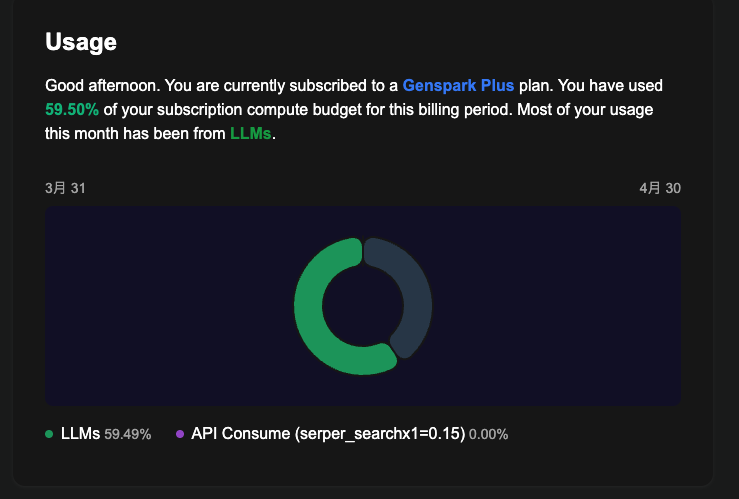
The day I noticed, the Usage dashboard was showing “LLMs: 59.49%” — meaning AI language models were being called repeatedly. I hadn’t run a single task. The rate worked out to roughly 2,100 credits disappearing per day.

This post is the follow-up: what I did about it, and what happened next.
Why Genspark Claw can burn credits in the background
The thing that makes Genspark Claw powerful is also what makes this problem possible. Claw includes a Cloud Computer — a Linux virtual machine that runs continuously, even when you have Genspark closed. This is what allows AI agents to handle scheduled tasks, manage files, and connect to external services automatically.
But “runs continuously” also means background services keep going whether you’re watching or not. If something breaks — an authentication token expires, a queued task gets stuck, a scheduled job misfires — the system can end up in a loop, calling LLMs repeatedly while you sleep.
That’s exactly what was happening here.
Three fixes, and one unexpected discovery
Genspark Claw’s Cloud Computer has a browser-based terminal. You don’t need to be a developer to use it — every command below can be copy-pasted directly. If the output looks confusing, just paste it into Claude or Genspark and ask what it means. That’s a perfectly valid approach.
To open it: from the Genspark dashboard, go to Cloud Computer → Terminal.
Fix #1: Stop openclaw-gateway (biggest impact)
This was the main culprit.
openclaw-gateway is the core service that powers Genspark Claw’s agent functionality — it handles AI automation, messaging integrations, and connections to external apps. In my case, I had set up a LINE integration (LINE is a popular messaging app in Japan). The authentication token for that integration had expired, and instead of failing gracefully, the service was caught in a loop: try to reconnect → fail → restart automatically → try again → repeat, roughly every 10 minutes. Each restart was triggering an LLM call, burning credits around the clock.
On top of that, openclaw-gateway is registered as a systemd service, meaning it automatically starts every time the Cloud Computer boots — whether you want it to or not.
# Stop the service and disable auto-start
systemctl --user stop openclaw-gateway
systemctl --user disable openclaw-gateway

# Confirm it's stopped
systemctl --user status openclaw-gateway
Once you see Active: inactive (dead), it’s stopped. This single step had the most impact.
Worth noting: stopping this also stops all of Claw’s agent functionality — automated tasks, external integrations, everything. That’s the trade-off.
Fix #2: Clear the stuck delivery queue
Genspark Claw keeps a delivery-queue folder for outgoing tasks that haven’t completed yet. A message I’d tried to send via LINE back on March 23rd had failed with a 400 - Bad Request error and was sitting in that queue, still being retried every time the gateway restarted.
# Check what's in the queue
ls -la /home/work/.openclaw/delivery-queue/

# Delete any stuck JSON files
rm /home/work/.openclaw/delivery-queue/*.json
If only a failed/ folder remains after the deletion, you’re done.
Fix #3: Reset the cron job config file
Genspark Claw lets you set up scheduled tasks — things like “send me a morning briefing at 7am.” I had a few of these, and I’d disabled them through the dashboard UI. The problem: they were still running. I was getting messages delivered every morning, which I hadn’t noticed because I use WhatsApp primarily and barely check the other app.
The local config file still had those jobs defined. Clearing it helped — though I suspect Genspark may also manage schedules server-side, so local changes alone might not be the full picture.
# Back up the current file first
cp /home/work/.openclaw/cron/jobs.json \
   /home/work/.openclaw/cron/jobs.json.bak

# Reset to empty
cat > /home/work/.openclaw/cron/jobs.json << 'EOF'
{
  "version": 1,
  "jobs": []
}
EOF
After fixes #1–3, daily consumption dropped significantly — but around 60 credits per day remained. So I kept digging.
sudo crontab -l
This shows scheduled tasks running at the system level (root). What I found:
3 1 * * * /usr/bin/npm install -g @genspark/cli@latest @anthropic-ai/claude-code@latest @openai/codex@latest
Every night at 1:03 AM, Genspark was automatically updating three CLI tools: its own CLI, Claude Code, and OpenAI Codex. This was registered silently during Genspark Claw’s initial setup — I had no idea it was there.
Whether those update installs trigger LLM calls is something I can’t confirm, but the timing lines up. I changed the frequency from daily to weekly:
sudo crontab -e
Change * * * to * * 1 (runs on Mondays only instead of every day):
# Before (runs daily)
3 1 * * * /usr/bin/npm install -g ...

# After (runs every Monday)
3 1 * * 1 /usr/bin/npm install -g ...
If you’re using nano: Ctrl+O to save, Ctrl+X to exit.
I chose to keep it running weekly rather than disabling it entirely — the tools are worth keeping up to date, just not every single day.
The results
| Credits consumed/day | |
|---|---|
| Before (April 2–3) | ~2,100 |
| After (April 3–4) | ~60 |
| Reduction | ~97% |
When I opened Genspark on the afternoon of April 4th, my credit balance had dropped by only about 60 from the previous day. The automated messages that had been showing up every morning? Gone too.
The roughly 60 credits per day that remain are likely tied to the weekly auto-update job — now that it runs once a week instead of daily, the impact should be around one-seventh of what it was.
What would actually fix this properly is Genspark improving the service itself: a detailed credit usage history in the dashboard, automatic error detection that stops retry loops instead of burning credits indefinitely, and UI settings that reliably sync with the server. None of that exists yet.
If you’re seeing the same thing: six steps to try
Paste these commands into your Cloud Computer terminal. If the output is confusing, copy it into Claude or another AI and ask for help — that’s exactly how I worked through a lot of this.
Step 1 — Find what’s running
ps aux | grep -E "openclaw|claw|genspark" | grep -v grep
If openclaw-gateway shows up, that’s your primary suspect.
Step 2 — Check the error logs
journalctl --user -u openclaw-gateway --since "today" | grep -E "error|restart|failed" | tail -30
If you see something like this repeating, you’ve got the same restart loop I had:
[genspark-im] channel exited: auth is not defined
[genspark-im] auto-restart attempt 1/10 in 5s
[health-monitor] restarting (reason: stopped)
Step 3 — Clear the delivery queue
# Check for stuck files
ls -la /home/work/.openclaw/delivery-queue/

# Delete them if present
rm /home/work/.openclaw/delivery-queue/*.json
Step 4 — Check your scheduled jobs
# Genspark Claw's own cron config
cat /home/work/.openclaw/cron/jobs.json

# System-level cron jobs (the one I missed)
sudo crontab -l
Pay particular attention to anything running daily in the system crontab that you didn’t set up yourself.
Step 5 — Stop openclaw-gateway
systemctl --user stop openclaw-gateway
systemctl --user disable openclaw-gateway

# Confirm
systemctl --user status openclaw-gateway
Active: inactive (dead) = stopped successfully.
Step 6 — Change the auto-update job to weekly
sudo crontab -e
Change * * * to * * 1 on the npm install line, then save.
Where things stand
A 97% reduction in one day is a meaningful result. The worst-case scenario — credits silently hitting zero — is no longer happening. But I want to be clear: this is a workaround, not a fix. The underlying issues (no credit transparency, no error notifications, UI settings that may not sync server-side) are still there.
I’ll keep monitoring and update this post if anything changes. If you’re running into the same problem, I hope this saves you some time.
Tags: Genspark, Genspark Claw, AI agents, credit consumption, Cloud Computer, Linux, productivity, AI tools
This article was written with the assistance of Claude (AI).



Hiroshi is a Tokyo-based project manager specialising in international operations within the global MedTech company. Originally from Hokkaido, he holds a postgraduate degree in international relations — including study periods in the United States and Sweden — and has lived and worked across Malaysia, Switzerland, China, and the Philippines.
Beyond his industry career, he served as Manager for the 23rd World Scout Jamboree in 2015, where he managed liaison with delegations from over 150 countries, coordinated with the World Organisation of the Scout Movement (WOSM), and led on-site risk response. He has also contributed to disaster relief efforts following the Great East Japan Earthquake and other natural disasters across Japan.
This blog covers travel, productivity, technology, and global careers — written as a way of thinking through ideas and consolidating what he learns along the way.
Discover more from hiroshi.today
Subscribe to get the latest posts sent to your email.